
English
The 100KB Image Challenge: Which Tools Can Hit a Hard Limit—and What Happens to Quality?
A smaller image is not automatically a better image. And "compress this to under 100KB" is a different task from "make this as small as possible."
Many workflows have a hard size cap: a CMS upload field, an email banner, a form attachment limit. For those jobs the question isn't "which compressor wins a leaderboard?" It's "which tool can hit my target, and what does it cost in quality?"
I tested DigImg and TinyPNG on the same four-image corpus, measuring downloaded bytes and quality. I also ran one Squoosh comparison (on the photo) to see how much manual tuning the target needs — Squoosh is not a full four-image data point here.
The setup
Four source images, all over 100KB:
| Input | Type | Size | Dimensions |
|---|---|---|---|
| photo-scene.jpg | photograph (noisy) | 652 KB | 1600×1000 |
| photo-gradient.jpg | photograph (gradient) | 556 KB | 1200×800 |
| screenshot-ui.png | UI screenshot | 143 KB | 1440×900 |
| illustration.png | graphic (noisy) | 1.34 MB | 1200×800 |
Target: ≤100KB, defined here as 102,400 bytes (100 KiB). Pass/fail uses the exact downloaded byte count, not each tool's rounded display. (Squoosh's 100,136-byte output passes 102,400, though it exceeds a decimal 100,000.) For lossy results I measured SSIM against the original (scikit-image, RGB, same dimensions).
These are synthetic images with heavy per-pixel noise, deliberately hard to compress, so the quality cost is visible. Real photos usually compress more gracefully — treat these numbers as input-specific, not universal.
What each tool does
- DigImg has a target-size feature: type "100KB" and it binary-searches encoder quality to land under the cap in one click. Runs in the browser.
- TinyPNG (free web) just compresses — no target-size control, no resize. You get whatever its smart lossy algorithm produces.
- Squoosh runs in the browser too, but hitting a target is manual: drag the quality slider and watch the output size.
The results
| Tool | Input | Output | Hit ≤100KB? | SSIM | How |
|---|---|---|---|---|---|
| DigImg | photo-scene | 93.7 KB | ✅ | 0.672 | auto target-search, 1 click |
| DigImg | photo-gradient | 93.6 KB | ✅ | 0.631 | auto target-search, 1 click |
| DigImg | screenshot-ui | 82.7 KB | ✅ | 0.978 | auto target-search, 1 click |
| DigImg | illustration | 97.6 KB | ✅ | 0.674 | auto target-search, 1 click |
| TinyPNG | photo-scene | 484.7 KB | ❌ | 0.960 | single compress, no target |
| TinyPNG | photo-gradient | 424.4 KB | ❌ | 0.953 | single compress, no target |
| TinyPNG | screenshot-ui | 67.0 KB | ✅ | 0.996 | single compress, no target |
| TinyPNG | illustration | 336.5 KB | ❌ | 0.925 | single compress, no target |
| Squoosh | photo-scene | 97.8 KB | ✅ | 0.676 | manual iteration (~7 steps observed) |
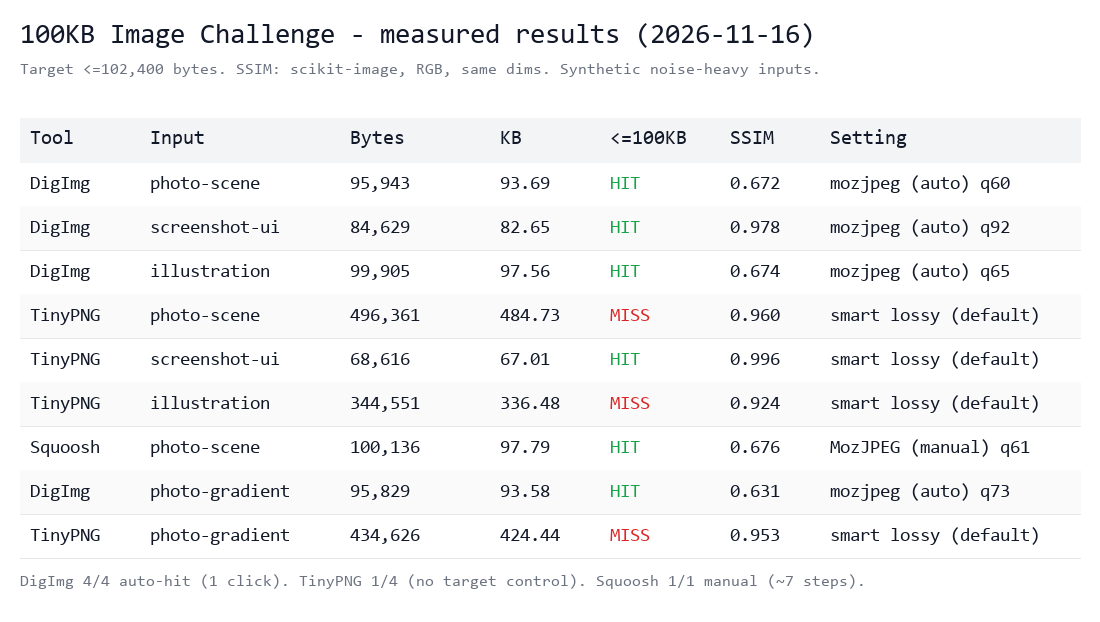 Figure 1 — Output bytes and hit/miss vs the 100KB cap.
What this shows
1. A hard cap needs more than "just compress." TinyPNG kept quality high (SSIM 0.92–0.996) but landed at 336–485KB on three of four inputs — nowhere near 100KB. The free web tool can't force the target. The screenshot was the only input it compressed below the threshold (its 143KB original was the smallest, but still above the cap).
2. Hitting the target costs quality. To squeeze a noisy 652KB photo under 100KB, DigImg dropped to q60 — SSIM fell to 0.67. Squoosh, manually tuned to q61, landed at the same place (0.676). On hard, detailed content a hard cap costs visible quality. "Smallest file AND best quality" is a sales pitch, not a result.
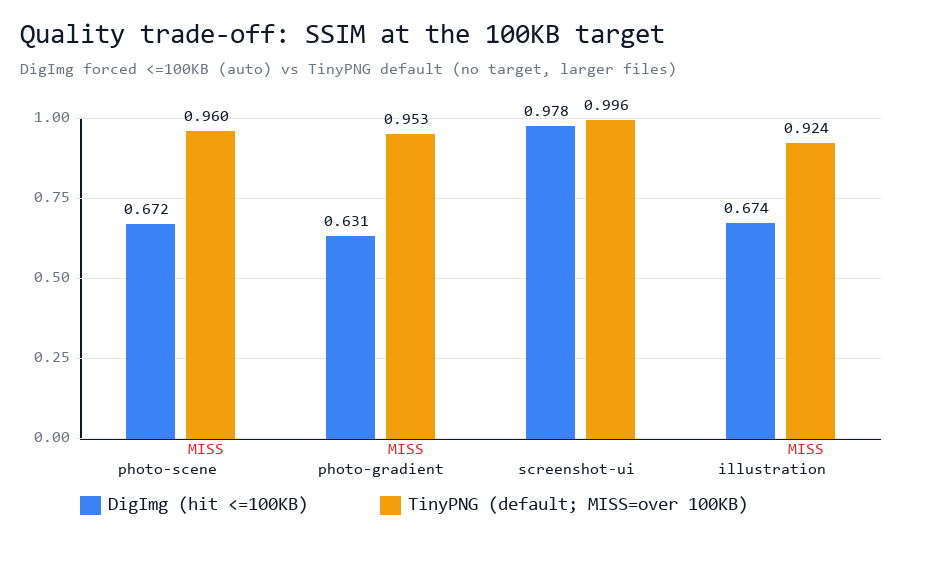 Figure 2 — SSIM per input: DigImg hits the cap but quality drops on noise; TinyPNG preserves quality but misses the cap.
3. The difference is workflow. DigImg and Squoosh both reached the target with MozJPEG at similar quality. DigImg's target-search did it in one click; Squoosh took ~7 manual slider adjustments. (The "~1–1.5s" search time and "~7 steps" are operator observations during this test, not fields in the results JSON, which records bytes, SSIM, settings and hit/miss.)
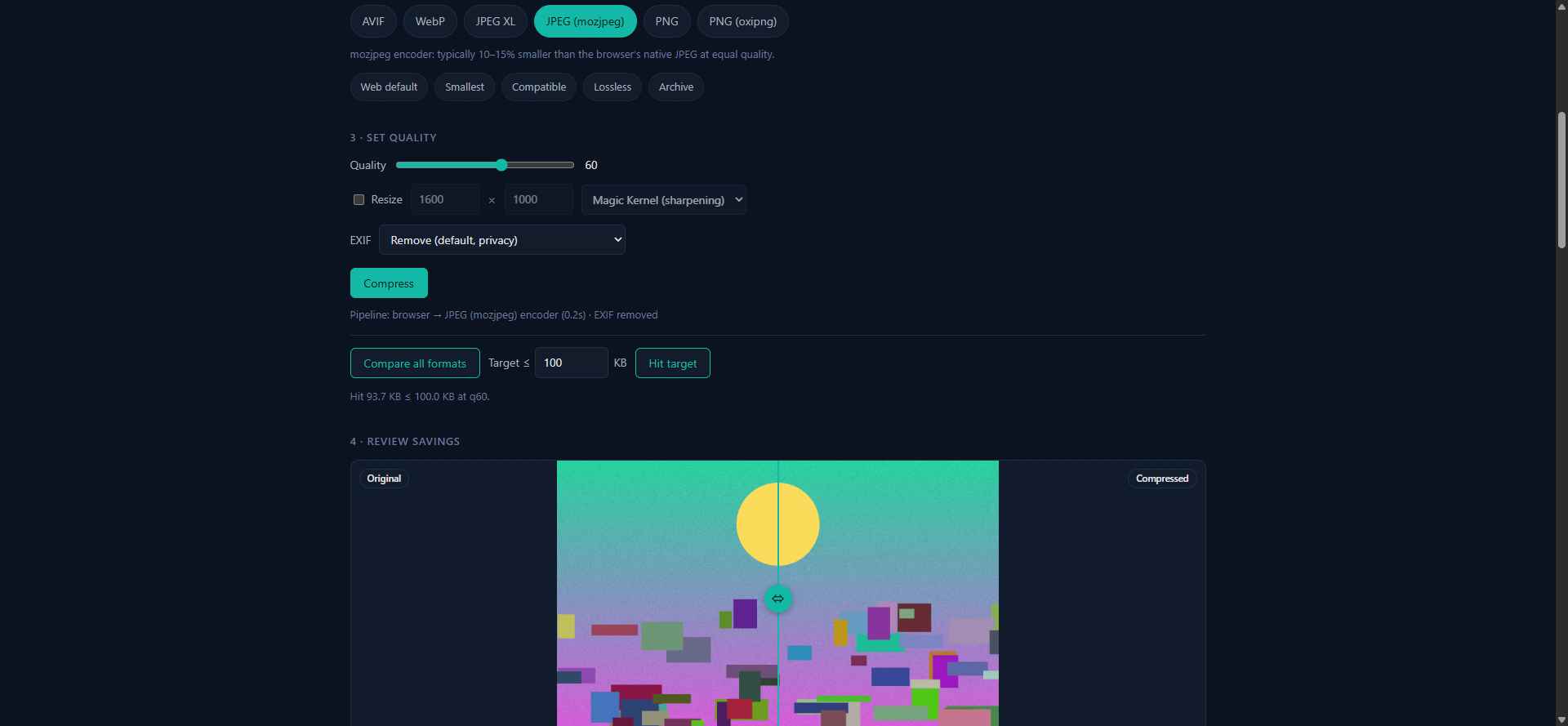 Figure 3 — DigImg: enter the target, click "Hit target", quality is searched automatically (q60, 93.7KB). Pipeline runs in-browser.
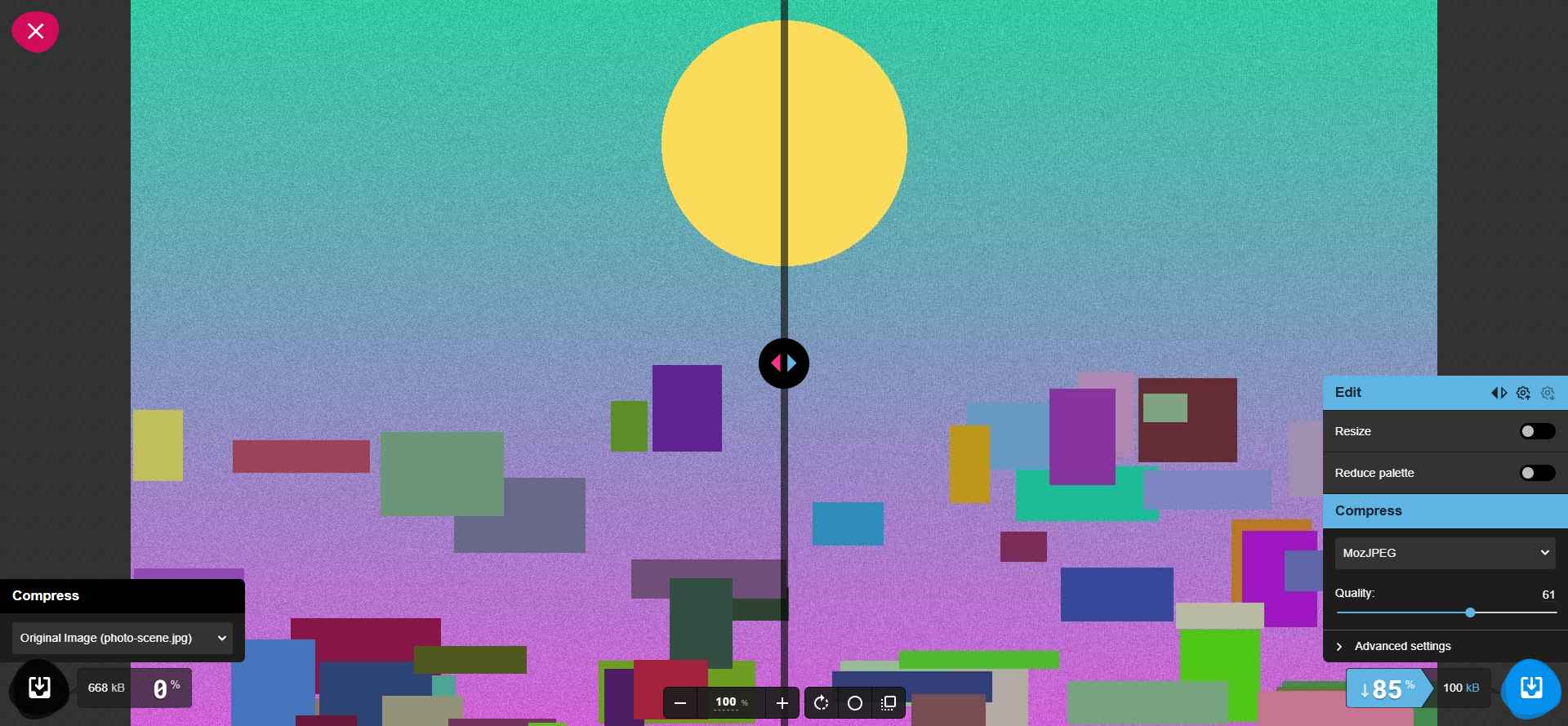 Figure 4 — Squoosh: reaching the cap means manually dragging the quality slider (q61) — no automatic target search.
4. Privacy is checkable, but the evidence is scoped. Across four runs, MAIN-world instrumentation of fetch, XHR and sendBeacon observed zero image-payload egress from DigImg — a scoped observation of these test workflows, not a packet-level audit, and not a claim of no network requests. Captured non-analytics activity was same-origin WASM asset fetches and local blob: fetches; analytics went to a staging Amplitude project. TinyPNG uploaded the image: a POST to tinypng.com/backend/opt/store carrying the full 668,374-byte blob, then a POST to /backend/opt/process carrying job metadata to start server-side compression.
Two fairness notes. TinyPNG's current JPG compressor docs say uploads are stored encrypted, download links expire after 8 hours, and images are deleted within 48 hours (official FAQ) — that confirms server-side processing and retention, not that it is insecure. Squoosh's docs also say images are processed locally, not sent to a server (README – Privacy); I did not run an equivalent capture on Squoosh here, so the zero-egress evidence is specific to DigImg.
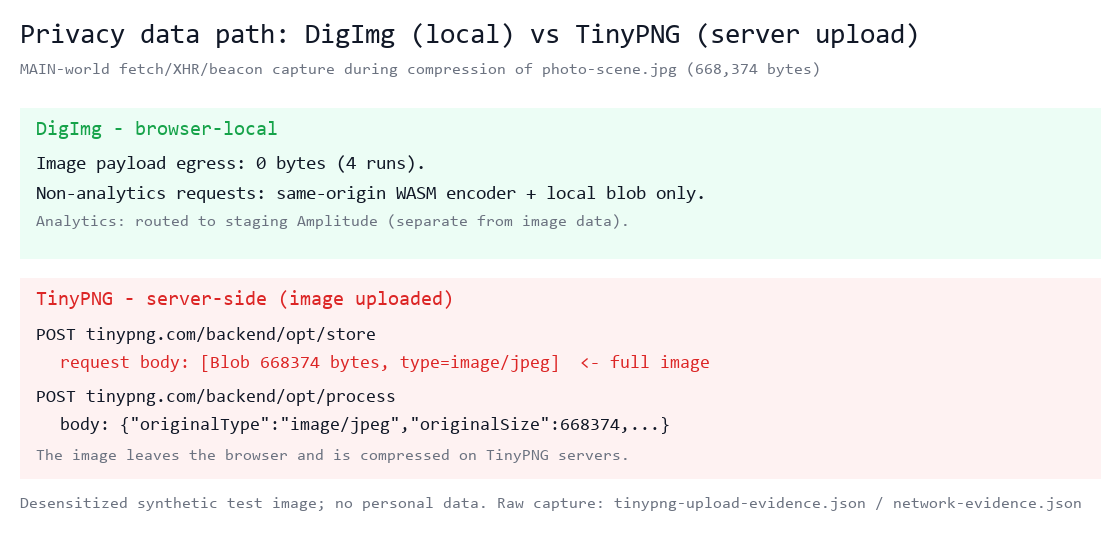 Figure 5 — DigImg: 0 image egress across 4 runs. TinyPNG: /opt/store uploads the full image blob.
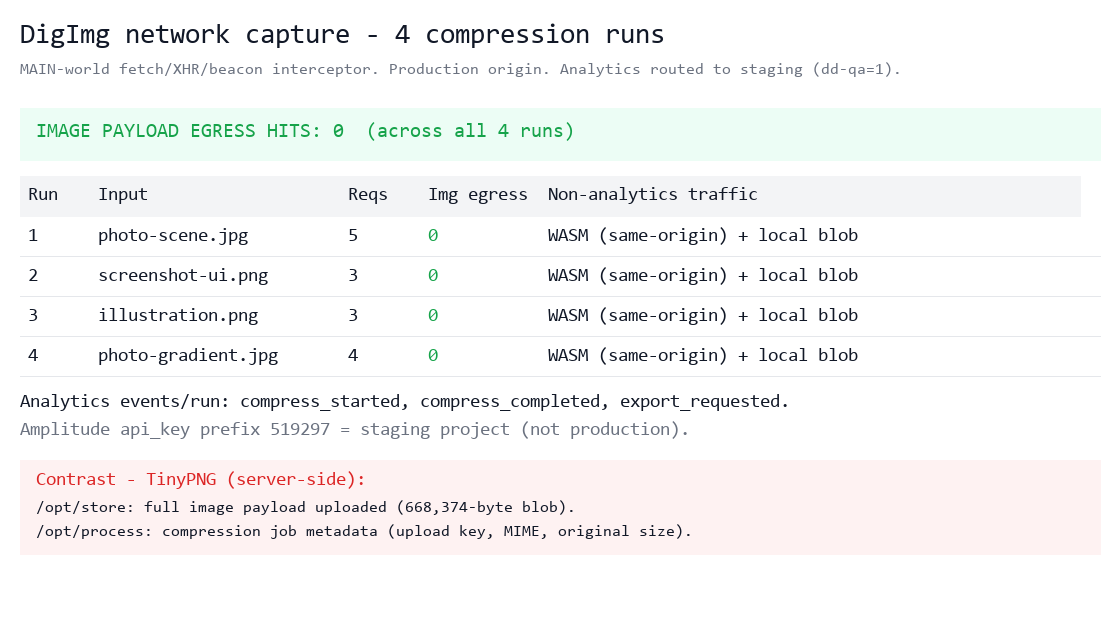 Figure 6 — DigImg four-run capture: image egress hits = 0; non-analytics = WASM + local blobs; analytics to staging.
Which should you pick?
- Hard size limit, fast: a target-size tool (DigImg) hits it in one click; Squoosh can too with manual tuning.
- Quality over a hard cap: TinyPNG's default preserved quality best here — but won't guarantee a size, and uploads your file.
- Small and pristine: that's a trade-off, not a feature. Resize, change format, or relax the cap.
The right question is never "which makes the smallest file?" It's "which output is small enough for my use case without damaging what matters?"
Limitations
- Four synthetic, noise-heavy inputs — not a universal benchmark; real photos differ.
- Target-size search applies to lossy codecs (mozjpeg/WebP/AVIF/JXL); lossless PNG has no quality knob.
- SSIM is one metric, not human visual judgment.
- Single runs; settings and versions affect results.
- Search time and Squoosh step count are operator observations, not instrumented JSON records.
- Privacy evidence is MAIN-world request-path instrumentation scoped to these four DigImg runs, not a packet-level audit; Squoosh was not network-captured.
Try it
DigImg runs in your browser, no account, no image upload: https://img.digdevbox.com/ Earlier same-image comparison: https://img.digdevbox.com/compare/ — that page contains a ShortPixel affiliate link; I may earn a commission. DigImg is my product; TinyPNG and Squoosh are independent.
Takeaway: Hit the file-size limit automatically. See the quality trade-off before you download. That's what DigImg's target-size search is for — not "always smaller," but "reach your hard cap in one click, with the quality cost shown honestly."
Disclosure: DigImg is my product. TinyPNG and Squoosh are independent. The linked comparison page has a ShortPixel affiliate link (commission possible). Inputs were synthetic and desensitized; no personal images. Squoosh tested on one input only; zero-egress evidence is specific to DigImg.